Before you begin
No previous experience required unless you choose a coding exercise. Use an account you are allowed to access; features vary by product and region.
What you will learn
- Explain what the model does versus what its tools do.
- Interpret performance and cost charts without treating them as guarantees.
- Write a clear project brief with a review boundary.
- Check an AI result against evidence.
Start with the model, not the marketing
GPT-6 Astra is an OpenAI model intended for demanding reasoning, coding, research, computer-use and document tasks. A model processes inputs and generates outputs. It is not, by itself, a browser, a robot, a file system or an independent employee. Those capabilities require an application that supplies tools and controls their access.
Think of a model as one part of a workshop. It can propose the next step, but the surrounding software provides the tools, permissions and workspace. In an agent application, the model can request an action, inspect the returned result and choose another action. This loop can solve more than a single chat reply—but it can also repeat a mistake unless someone checks the outcome.
What is new—and what remains your responsibility?
OpenAI’s current model guide describes asynchronous tool calling and mid-turn steering. In plain English, an application can let useful independent work continue while a tool is busy, and can pass a correction into work already underway. The application still has to implement the supported mechanisms; these are not automatic features of every website that uses Astra.
For a learner, the practical idea is simple: state the result you need, provide the relevant material and correct misunderstandings early. You remain responsible for deciding whether the answer is good enough. A fluent explanation is not a test result, and a completed file is not necessarily a correct file.
Sources: OpenAI: Using GPT-6 Astra
Context, tokens and cost in ordinary language
The official API page lists a 1,050,000-token context window and up to 128,000 output tokens. Context is the working material a request can contain; output is what it generates. Capacity does not guarantee that every detail is used correctly.
Tokens are encoded units, not characters or words. The supplied launch translation says pricing uses characters; the official documentation says tokens. Access, quotas and billing depend on the product. Task cost also includes the effect of repeated attempts and tools, so token price alone is not the whole comparison.
How to read the nine supplied benchmark charts
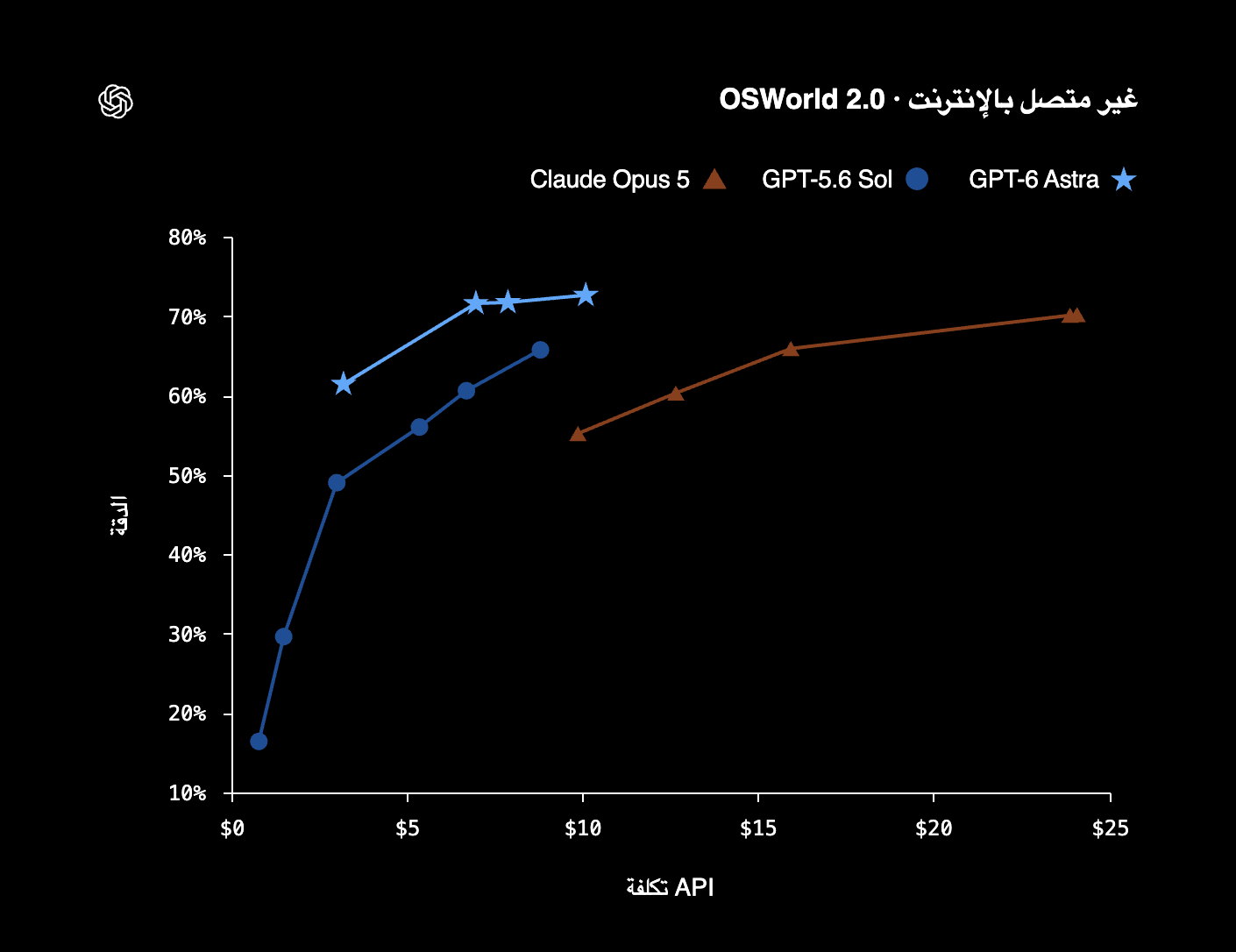
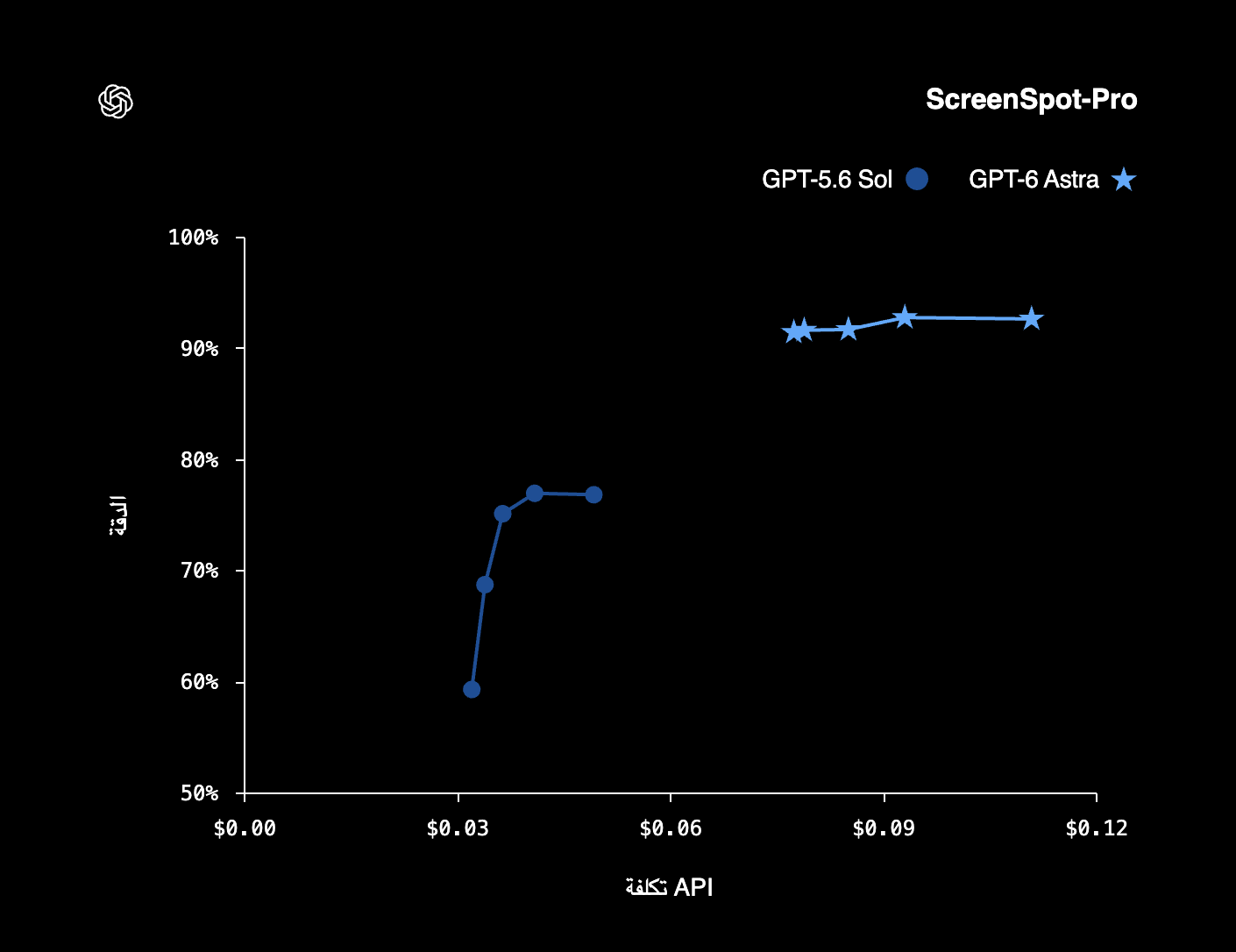
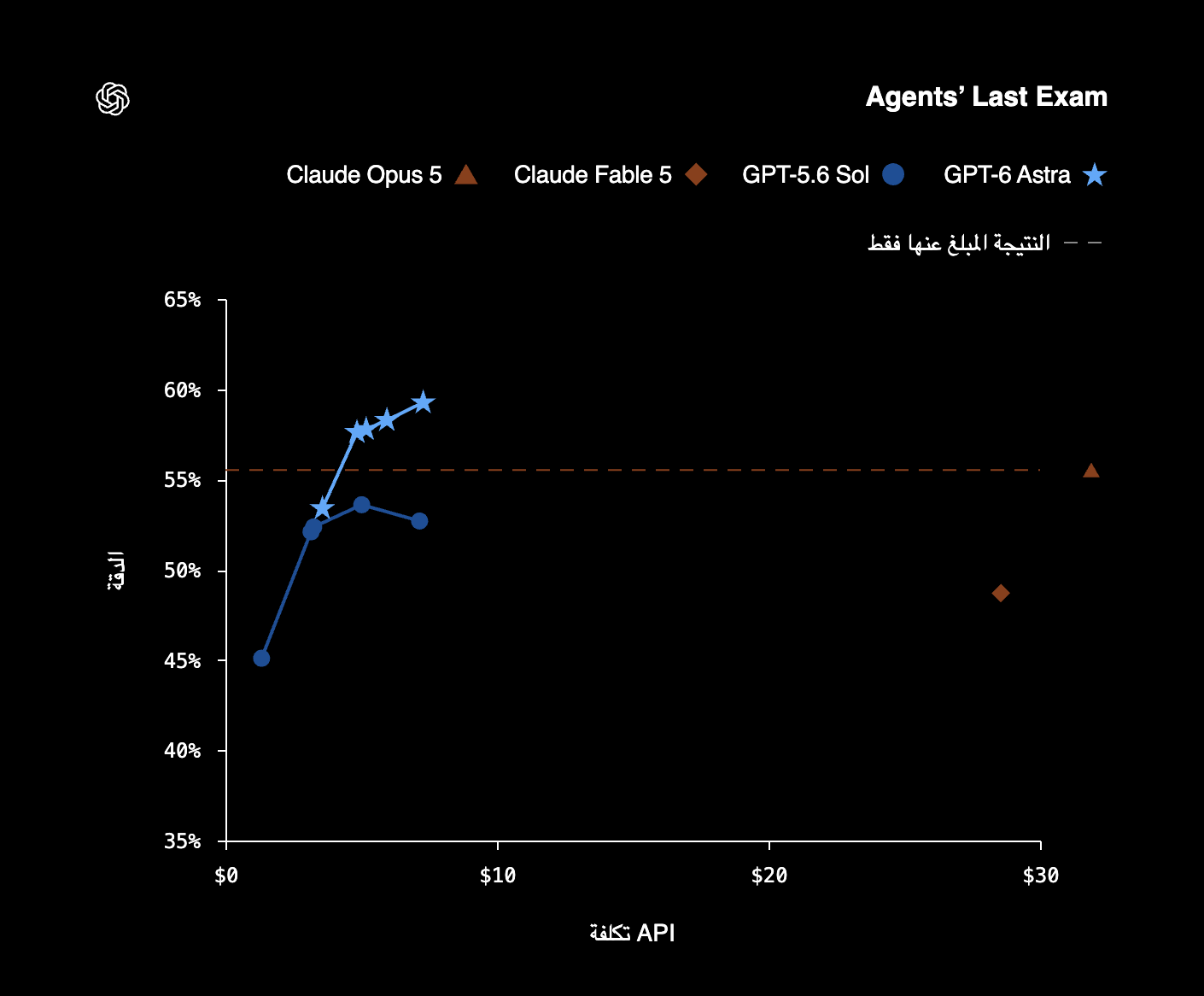
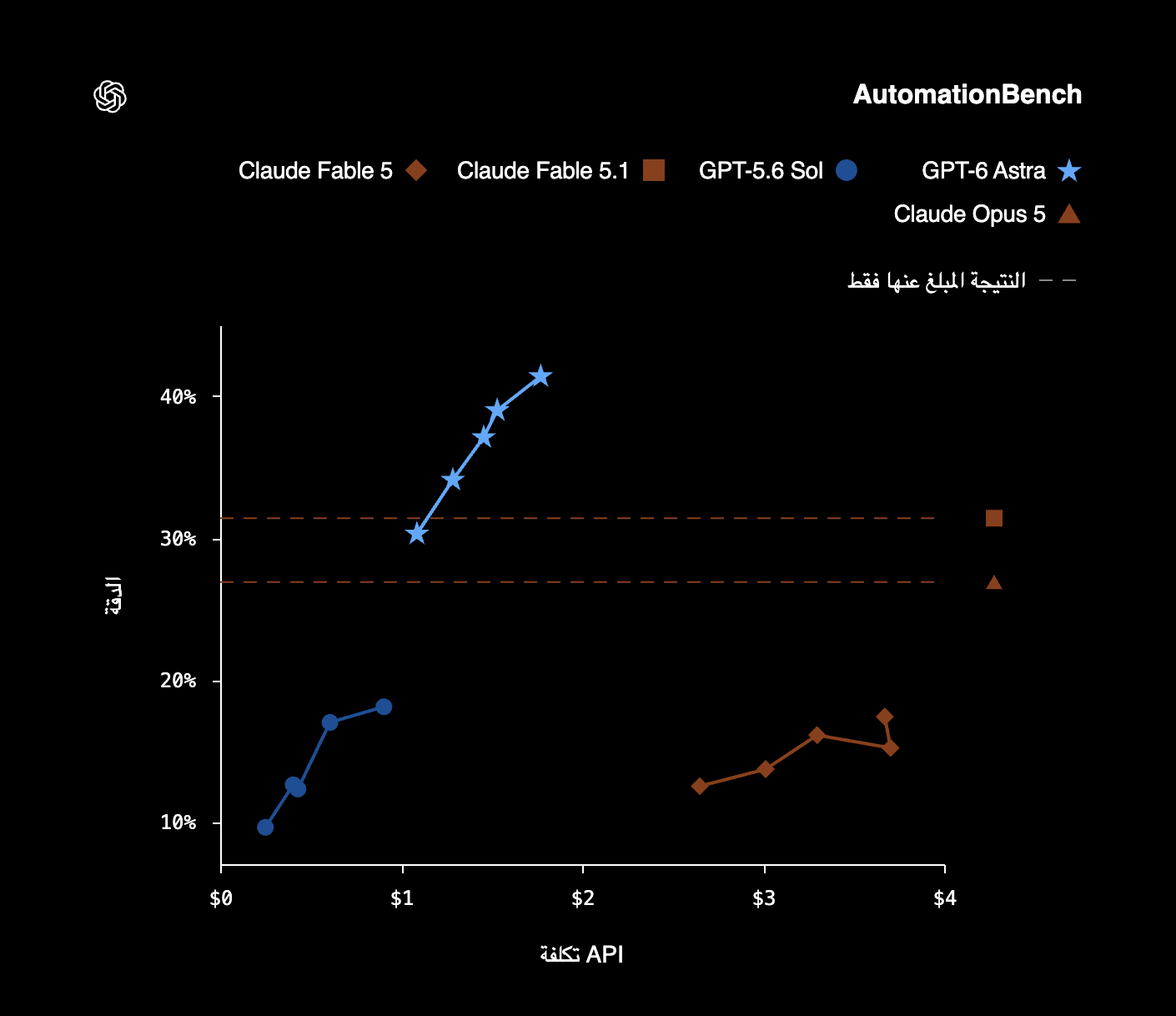
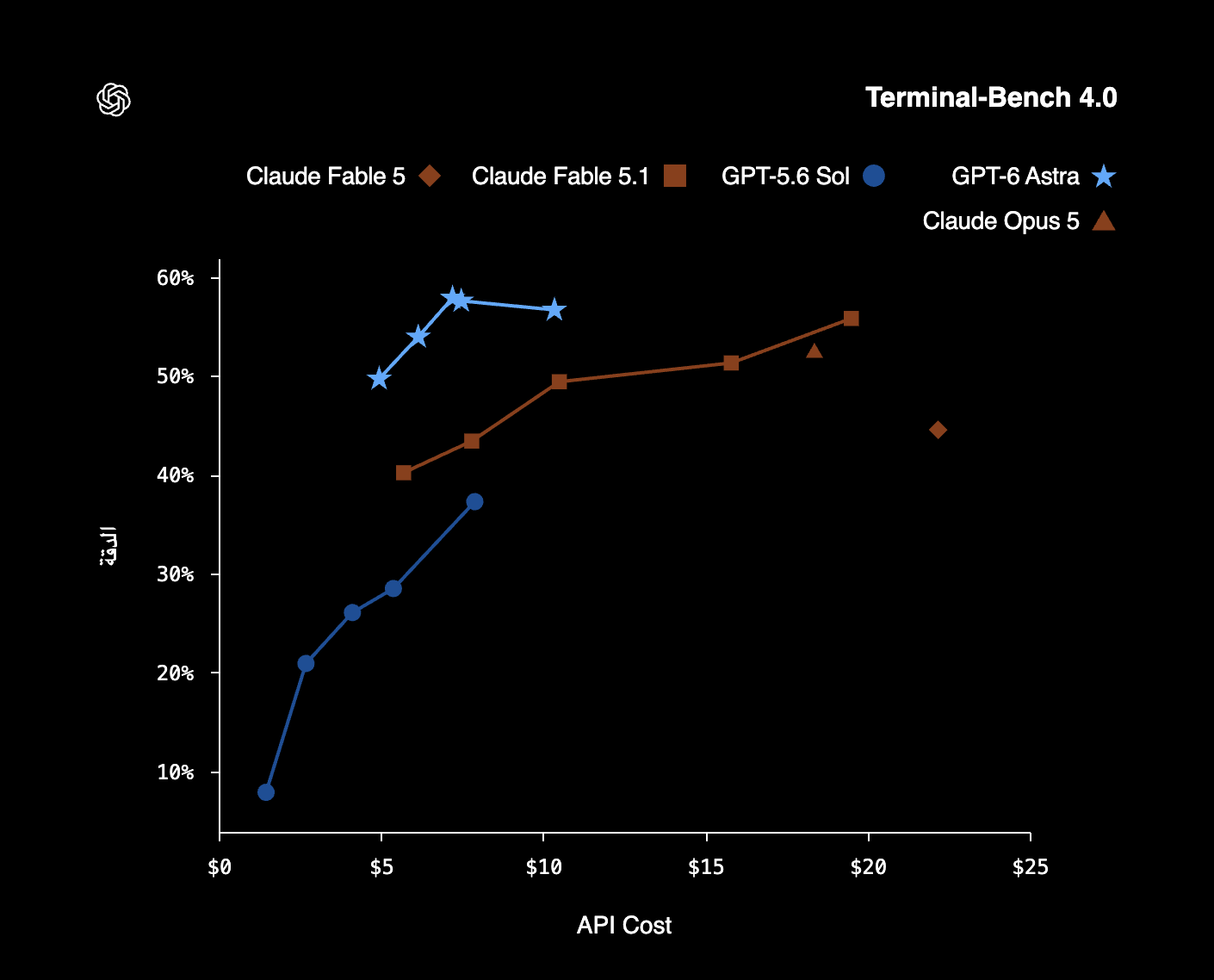
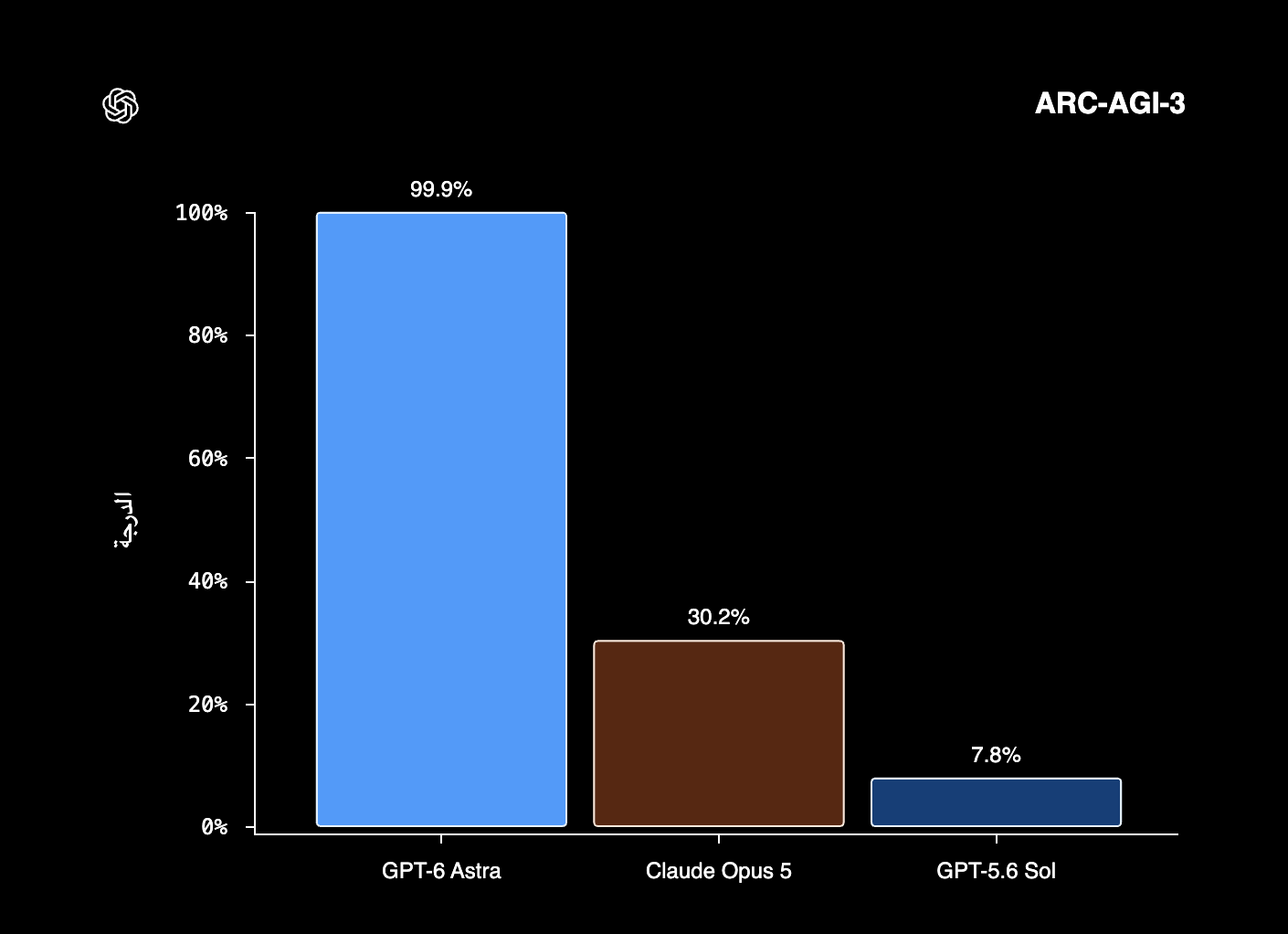
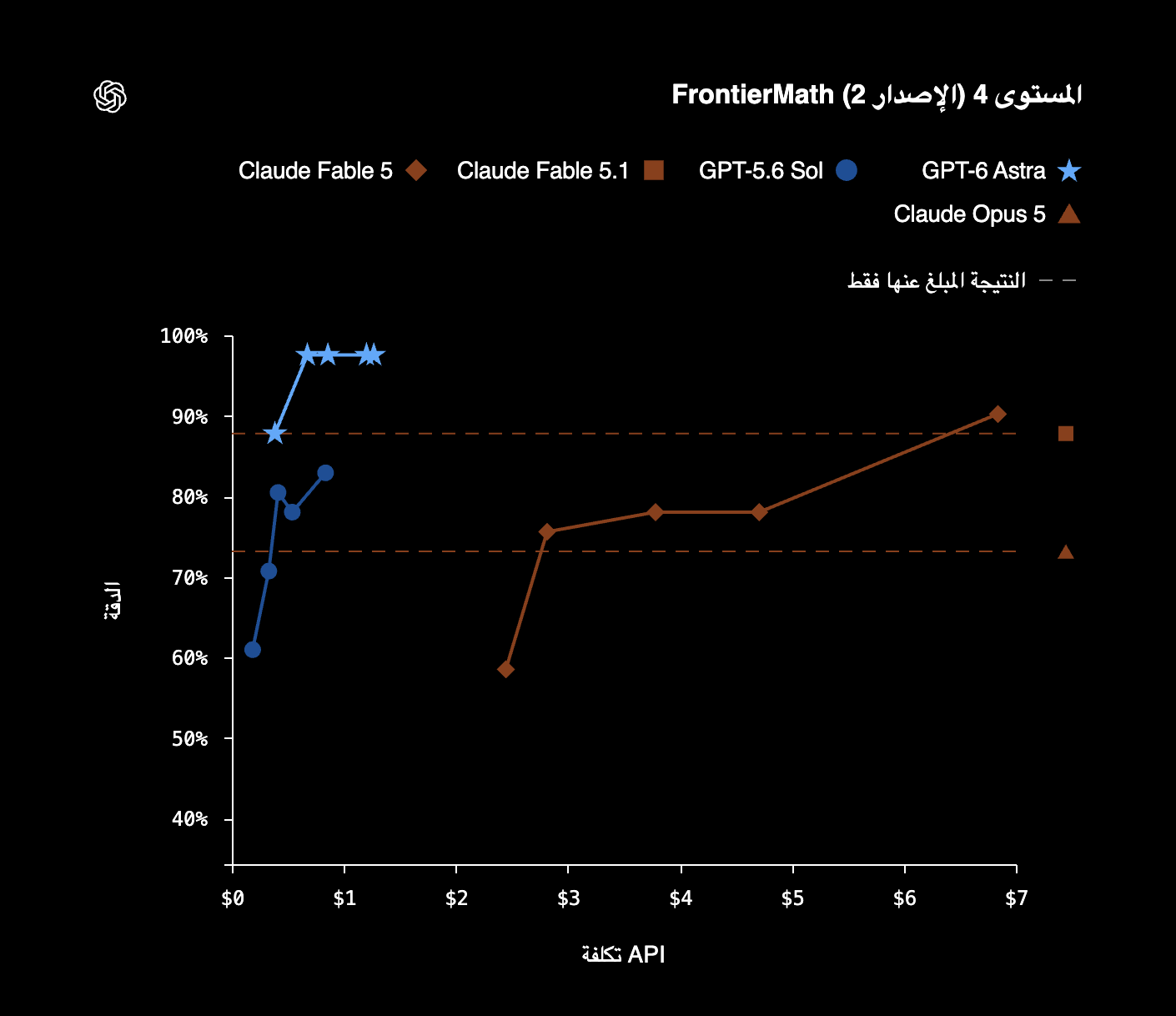
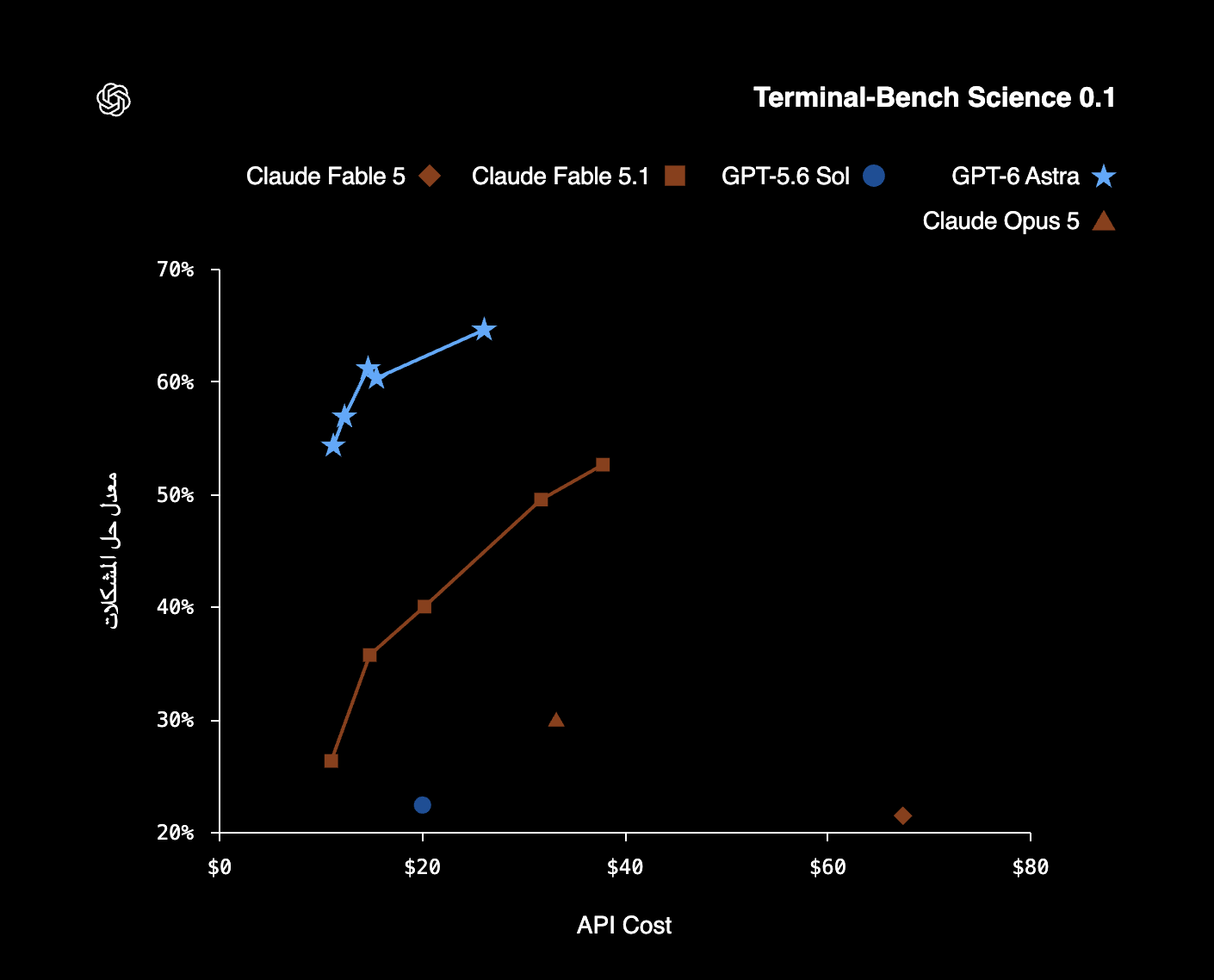
A benchmark is a defined set of tasks with a scoring procedure. The gallery below preserves the nine images supplied for this draft. Their numbers are reported claims from the supplied material; this Learning Lab has not independently rerun the tests. The model documentation check confirms product details, not a replication of every chart.
On a cost-versus-performance graph, the horizontal axis represents the estimated API cost used for that evaluation. The vertical axis represents the stated score. A point farther up may be better on that metric, but not necessarily faster, more private or more useful for your assignment. Some charts start their vertical axis above zero, making differences look larger than they would on a zero-based axis.
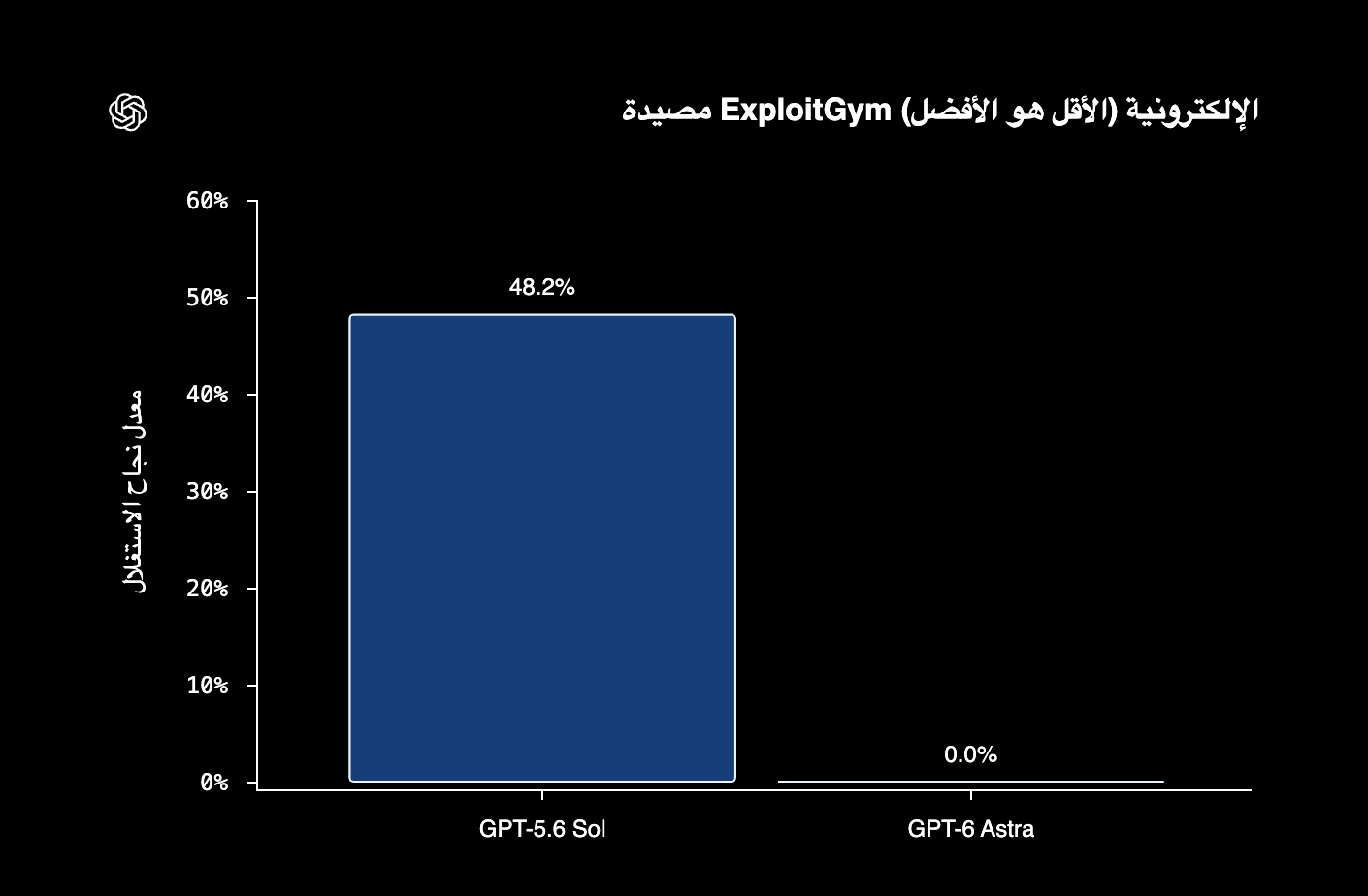
The ExploitGym trap chart is especially easy to misread: lower is better there. It is separate from an exploit-completion benchmark with a similar name. Likewise, an offline OSWorld subset is not interchangeable with every other OSWorld result. Tool access, effort settings, time limits and scoring rules can change a comparison.
The ARC-AGI-3 screenshot reports a very high Astra score. That result, even if reproduced under the same conditions, would describe performance on that evaluation—not proof that the system understands every situation or can safely act without supervision. Always ask what was measured and what was left out.
A useful first task: turn notes into a checked study aid
Choose one page of your own non-private notes. Ask Astra for a short explanation, three practice questions and a list of statements the notes do not support. Request that it label missing information instead of filling gaps silently. This is a manageable task because you already possess the evidence needed to review it.
Read the explanation against your notes. Answer the practice questions before revealing answers. If a question tests something absent from the notes, either remove it or find a reliable source for that topic. Then write a two-sentence explanation without looking at the generated guide. Remembering the explanation is the learning outcome; generating the guide is only a step.
- Input: one page of notes you have permission to use.
- Output: a brief explanation, three questions and an uncertainty list.
- Success check: every factual claim is supported, and you can answer independently.
- Boundary: no posting, messaging or changes to external services.
What the supplied project stories teach
The supplied game-building and architectural-visualization articles show a useful pattern: describe the intended experience, inspect an intermediate result, and refine it using concrete observations. A good screenshot cannot prove that game controls work. An attractive house rendering cannot certify a building design.
The supplied prompting and maintenance articles suggest keeping reusable instructions focused on the workflow they serve. The automation example records actions and decisions so another person can inspect them. These are ideas to evaluate, not instructions that override this project’s policies. In this publication, every news draft still needs your approval before posting.
Sources: Supplied case study: Building games with AstraSupplied case study: Architectural visualizationSupplied article: Rethinking skills and promptsSupplied article: Automating repetitive work
Important terms
Model: the learned system producing an output. Agent: an application that uses a model in a repeated action-and-feedback loop. Context: material available for a response. Benchmark: a defined evaluation. Harness: the surrounding software and tools used during a test. Verification: checking a claim or result against evidence.
You do not need to program to begin studying with an AI assistant. You do need enough subject knowledge, reliable references or suitable tests to check the work. Start with reversible tasks; leave publishing, purchases and changes to physical devices behind an explicit approval step.
Try this prompt
This is a suggested exercise, not a tested guarantee of any model’s output.
Use only the notes below to teach me this topic. I am a beginner. Write a 200-word explanation, then three practice questions with answers in a separate section. Identify unsupported or conflicting statements. Do not invent citations. Do not publish, send messages or change external files. Notes: [paste notes you may share].
Mini project & challenge
- Run the prompt on your own notes and underline each factual claim in the result.
- Match every claim to a sentence in the notes or mark it unsupported.
- Answer the questions without the notes, then explain one mistake in your own words.
- Challenge: repeat the task with another model and compare correctness using the same checklist, not writing style alone.
Common mistakes
- Treating a benchmark lead as a guarantee for your project.
- Confusing a product’s tools with capabilities available in every model interface.
- Equating zero observed failures with zero possible failures.
- Pasting passwords, private student information or confidential material into a prompt.
Check your understanding
- Does Astra alone contain your browser and files?
- Are tokens the same as characters?
- Why should OSWorld settings accompany a score?
- What does zero failures in a test establish?
- What is a better first success measure than a polished study guide?
- What does a context window describe?
- Why can token price and task cost tell different stories?
- What does the surrounding agent software provide?
- Is the ExploitGym trap chart the same as an exploit-completion chart?
- What should you do with an unsupported study-guide claim?
Show answers
- No. An application supplies tools and permitted access.
- No. Tokens are encoded units; character and token counts differ.
- Subsets, scoring and tool configurations affect what the score measures.
- No failures were observed under that test’s conditions; it does not prove universal safety.
- Whether its claims are supported and you can answer questions independently.
- The amount of working material a request can contain, not guaranteed comprehension.
- Attempts, output length and tool calls affect the total cost of completing a task.
- Tools, permissions, workspace access and the action-feedback loop.
- No. The trap measures unwanted boundary violations, with lower being better.
- Remove it or verify it using a reliable source before learning from it.
In short
Astra can support demanding work, but useful results still depend on the task, tools, evidence and review. Use benchmarks as one piece of information, start with a bounded exercise, and keep consequential actions under human control.
Your supplied benchmark charts
Original images supplied for review. The Arabic labels indicate accuracy or score, API cost, and—in the trap chart—exploit success rate with lower being better. Curves and isolated reported points do not establish identical testing conditions. Open each image to inspect it at full size.
OSWorld 2.0 · Offline
ScreenSpot-Pro
Agents’ Last Exam
ExploitGym trap · Lower is better
AutomationBench
Terminal-Bench 4.0
ARC-AGI-3
FrontierMath · Level 4 · Version 2
Terminal-Bench Science 0.1
Sources & review notes
- OpenAI: GPT-6 Astra model documentation
- OpenAI: Using GPT-6 Astra
- Supplied launch text and evaluation footnotes
User-supplied material; benchmark replication not performed.
- Supplied case study: Building games with Astra
- Supplied case study: Architectural visualization
- Supplied article: Rethinking skills and prompts
- Supplied article: Automating repetitive work
Product information was checked on 2026-09-19. This is a selected beginner guide, not an exhaustive archive of every announcement. Recheck access, pricing and compatibility before publication. Supplied screenshots remain unreplicated claims.